
Add material
Enter it manually, import a file or prepare an AI draft with Advanced.
Open beta
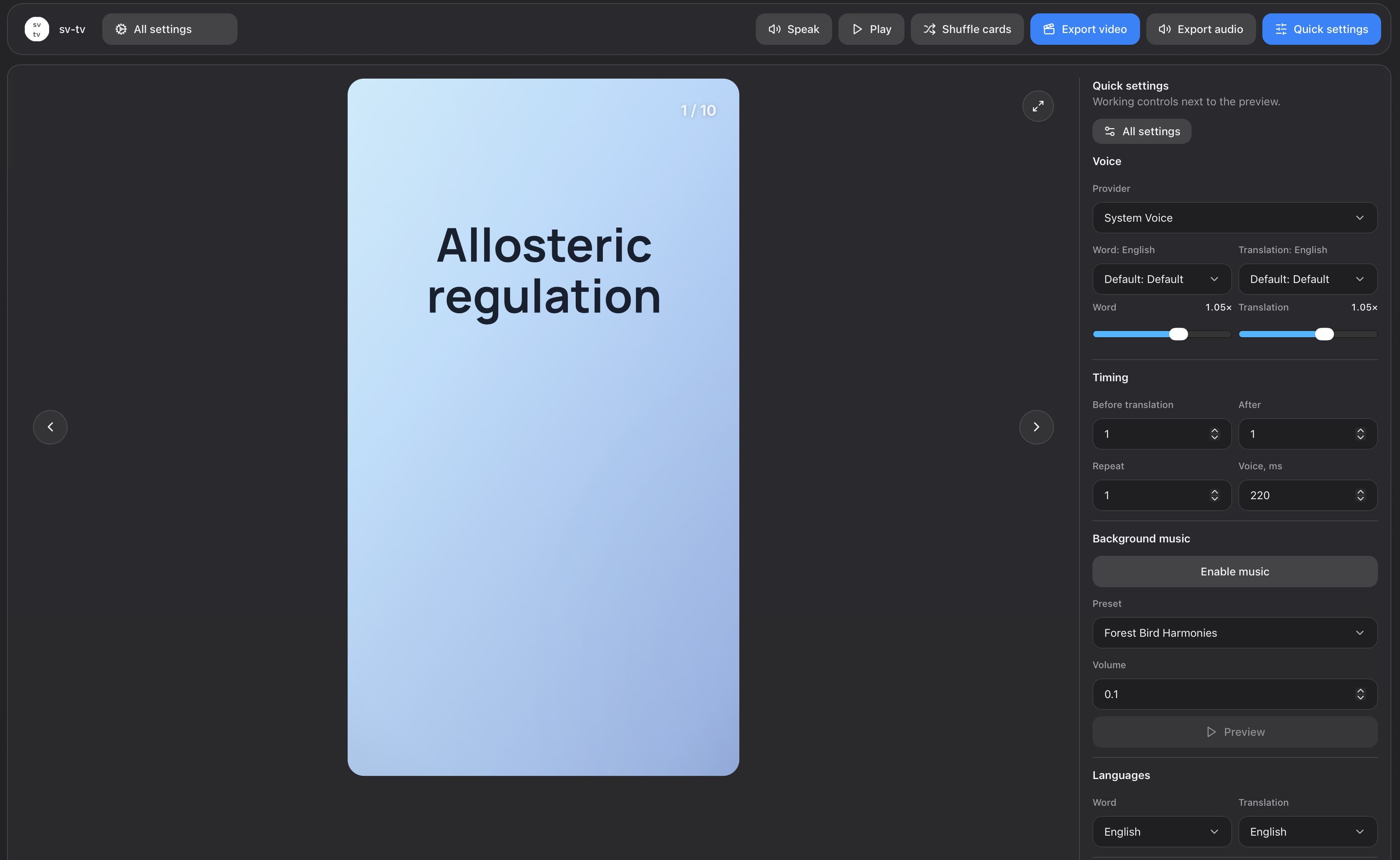
In the Memoxy app for Mac, you can turn words, phrases, terms, rules and questions into video and audio flashcards for language learning, revision, exam preparation and presentations.
How it works
Turn your material into a ready-to-use file in three steps.
Enter it manually, import a file or prepare an AI draft with Advanced.
Check the content, then choose the card design, voice and speaking rate.
Export the set as a video or audio file.
Output formats
Choose the result that fits where and how you want to review.
Vertical 9:16 video for phones and vertical video platforms.
Horizontal 16:9 video for large screens, lessons and presentations.
An audio file for reviewing while travelling, walking or doing household tasks.
Cards
You do not need to prepare video and audio flashcards separately. Review the material once, choose the voice and card order, then save video, audio or both formats.
Keep one complete idea on each card. A term and its definition can appear together on one side or be split between the two sides. Divide a long set of notes, article or explanation into short, self-contained sections first. Memoxy warns you if the text does not fit or becomes too small.
Use Memoxy to prepare video and audio flashcards for a range of study and work tasks.
Anna's English-speaking class is preparing for a role-play about visiting a bank in Spanish. She turns fifteen practical English prompts and their Spanish translations about accounts, transfers, fees and card problems into a vertical video for practice.
Ilya is preparing for a product manager interview in English. He makes ten English-only video flashcards with difficult case questions about metrics, roadmap conflicts, experiments and launch trade-offs, and puts a concise answer structure on the other side.
Two new people join Denis's support team. He makes English-only narrated video flashcards with a workplace term on one side and a short definition on the other to help them settle in.
Marina has recently moved to Spain and is still learning Spanish. Before a doctor's appointment, she prepares English prompts with Spanish translations for reception and the consultation, then turns the set into a vertical video to practise beforehand.
Maxim is preparing for a university molecular biology exam. He makes English-only video flashcards with a university-level term such as alternative splicing or oxidative phosphorylation on one side and a precise definition on the other.
Lena runs a channel for English speakers learning Spanish. For her next post, she prepares fifteen practical English prompts and conversational Spanish translations for booking and renting a car, including insurance, the deposit, pickup and return.
Victoria is preparing for a trip to Spain. She makes a naturally narrated audio from 25 Spanish travel words with English translations and listens to it during her evening meditation.
Settings
Before saving, adjust the card sides and order, visual style, voice, speaking rate and video format. Visual changes appear immediately in the preview, and you can listen to the voice and background audio in advance.
Cards can be one- or two-sided, and language material can include a transcription. Before previewing or saving, you can temporarily shuffle the set and choose how many times the source text is spoken. Shuffling does not change the saved card order.
Choose the font, text size and position, background and gradient. Select a resolution suited to the target screen and task.
Mac system voices are available in Free and require no separate account. Advanced lets you connect external text-to-speech services using your own account and API key; those services may charge separately. External-service usage is not included with Advanced. Choose a voice to suit the language and material, then listen to a card before saving.
With Advanced, choose background music or nature sounds, adjust the volume and preview them with the voice-over. The background track is included in the finished video or audio file.
AI features are available only with Advanced. Use them to prepare a new set from your description or edit an existing set. Review and change the draft before applying it, save it separately or add it to the current set. Results depend on the selected model, so check the facts and wording.
Advanced includes access to the AI features, but you must configure OpenRouter or Ollama separately. OpenRouter requires your own account, API key, internet connection and credit; model tokens are charged separately by OpenRouter. Ollama is installed and run locally and uses your Mac's resources.
Data
The app's main data stays on your Mac. Material is sent to an external service only after you connect and select that service in Memoxy.
Cards, saved sets, settings and AI request history are stored on your Mac. You can reopen, edit or delete sets and clear the AI request history. When generating speech again, Memoxy can reuse locally stored audio if the text, voice and speech settings have not changed.
An external AI or text-to-speech service receives material only after you connect and select it in Memoxy. To keep material on your Mac, use Ollama for AI and a Mac system voice for speech. The short Advanced registration sends only your email address, selected role and use case, and permission to contact you later for brief feedback, so we can provide the activation code and ask about your experience if needed.
Versions
During the open beta, Free is available without registration. Add material, review cards and save video or audio with up to 100 cards per export. After a short registration, you can activate Advanced free for one year. It adds AI features, connected voices, background audio, extra styles and up to 1,000 cards per export.
| Feature | Free | Advanced |
|---|---|---|
| Access | No registration | One-year Advanced activation code after a short registration |
| Manual entry and import of files | Yes. | Yes. |
| Editing and previewing cards | Yes. | Yes. |
| Mac system voices | Yes. | Yes. |
| Save video and audio | Yes. | Yes. |
| Cards in one export | Up to 100. | Up to 1,000. |
| AI generation and AI editing of sets | No. | Yes. |
| Connected text-to-speech services | No. | Yes. |
| Background music and sounds of nature | No. | Yes. |
| Extra styles and higher text clarity | No. | Yes. |
| Watermark in video | Required | Customisable or removable |
Beta
Registration asks for your email address, role and main use case. We will email you a one-time link that confirms your address and opens your account. You can then request a one-year Advanced activation code.
We may contact you later to ask what worked well and what got in your way. Your feedback can help us improve Memoxy.
FAQ
You can work with existing material and Mac system voices offline. An internet connection is needed only for connected online AI and text-to-speech services.
Memoxy supports TXT, Markdown, CSV, TSV and XLSX. You can also paste a short list directly into the editor.
With Advanced, you can prepare an editable draft through OpenRouter or a local Ollama installation. OpenRouter requires your own account, API key, internet connection and credit; model tokens are charged separately by OpenRouter. Ollama is installed separately and uses your Mac's resources. Results depend on the model, so review the facts and wording before applying a draft.
Mac system voices require no separate account. Connected text-to-speech services require your own account and API key and may have their own limits and charges. Neither Free nor Advanced includes payment for those services. Material is sent only after you connect and select a service.
Yes. With Advanced, choose music or nature sounds, adjust the volume and preview them with the voice-over. The background track is included in the finished video or audio file.
No. Cards can contain terms and definitions, questions and short answers, dates, facts and brief work procedures. The format works best with short material and one complete idea per card.
Cards, saved sets, settings and AI request history are stored on your Mac. An external service receives material only when you connect and select it for AI or speech. Data from the short Advanced registration is sent to the website separately.
Free covers the complete basic workflow from cards to video or audio, allows up to 100 cards per export and requires no registration. Advanced allows up to 1,000 cards per export and adds AI generation and editing, connected voices, extra styles, higher text clarity and the option to remove the required video watermark.
The current x64 test build is intended for Intel-based Macs. Apple Silicon is not yet supported. Installation details are listed on the Support page.
The Support page explains how to install Memoxy, find logs and report a problem. You can include a small anonymised material sample, the error text or a screenshot.
Currently, Memoxy is only available for Mac. There is no information on the Windows version timing yet.